How to track your golf score on Apple Watch: every tap from the first tee to the last green
"I have an Apple Watch. How do I actually keep score on it?" "Do I still need my phone in my pocket?" Most pages that answer this search list apps, then stop. This guide shows the steps instead: what you need before the round, what you tap on each hole, what happens at the end, and which parts still need the iPhone. We use GolfCounter, the app we make, as the worked example, with the button names exactly as they appear on the Watch, and finish with the problems golfers most often run into.
The short answer
- Install a golf score app on the iPhone; the Watch version installs from there.
- Open it on the Watch at the first tee and tap once per stroke, with putts and penalties on their own buttons.
- Send the round at the end and review it on the iPhone. The phone can stay in the bag during play.
1. What you need before the round
The Apple Watch cannot keep a golf scorecard by itself. Apple's list of workout types includes Golf, but a workout records exercise, not strokes or putts per hole. For a score you need a golf app on the Watch. With GolfCounter, the checklist is short.
- An Apple Watch on watchOS 9 or later, paired with your iPhone. That is the minimum for GolfCounter's Watch app, as listed on the GolfCounter app page.
- The iPhone, once, before the round. You install and sign in on the phone. During the round it is optional.
- No cellular plan. Counting needs no signal, so a GPS-only Watch is fine. Apple explains that the Watch uses Bluetooth when the iPhone is near and tries a known Wi-Fi network otherwise (Apple Support); GolfCounter simply holds the round until one of those connections is back.
- A charged Watch. Start a full round with a full battery until you know how your own Watch behaves.
If you are still deciding whether to leave the phone behind, our guide to golf apps that work on the Apple Watch without the iPhone explains what "standalone" really means.
2. Step by step: track your golf score on Apple Watch with GolfCounter
Each step below matches what you see on the Watch. Button names are quoted exactly.
- Install GolfCounter on the iPhone and sign in. Download it from the App Store on the iPhone paired with your Watch, open it once and sign in. If you skip signing in, the Watch still counts, and the round is saved once you sign in on the phone.
- Put the app on the Watch. Apple Watch installs the watch version of your iPhone apps automatically by default. If GolfCounter is not there, open the Watch app on the iPhone, tap My Watch, then Apps, scroll to Available Apps and tap Install (Apple Support).
- Open GolfCounter on the Watch at the first tee. It opens on hole 1, shown as "1H", with a big 0 and the hint "Tap for stroke 1". There is no course to load and nothing to set up. The first time, the Watch may ask for Health access; that is used to show steps and active calories and to save the round as a Golf workout, and the counter works whether you allow it or not.
- Tap the big number once per stroke. The number goes up by one and the Watch clicks on your wrist, so you know the tap counted without looking. The hint changes to "Tap +1 · Hold −1": hold the number and a ring fills around the edge of the screen for one second, with "Remove 1 stroke" and "Release to cancel". Let go early and nothing is removed.
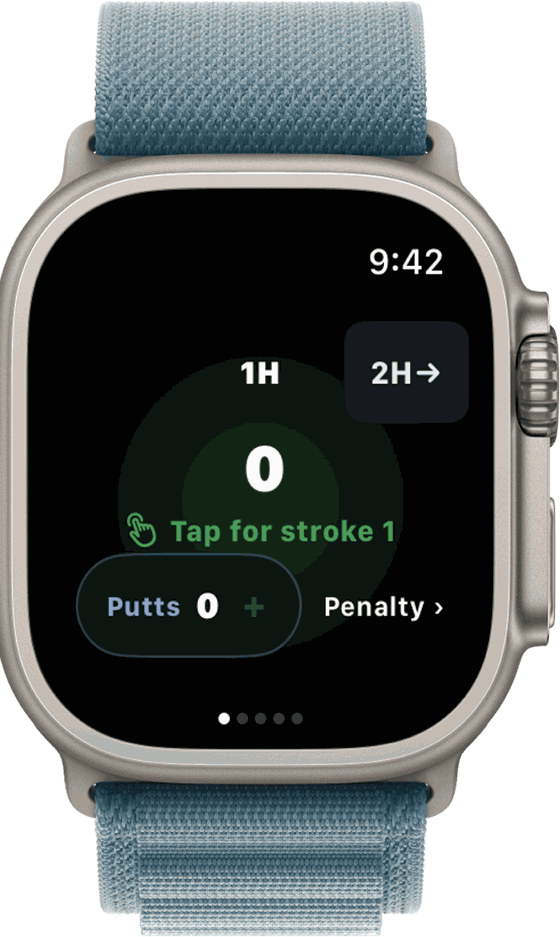
- Tap "Putts" on the green. For each putt, tap the Putts button at the bottom instead of the big number. The big number is the hole total and already includes the putts, so every stroke is still one tap. Hold Putts to remove one. Why bother? Our guide to counting putts explains what putts per round tells you.
- Add penalties. Tap "Penalty ›" to open the "Hole 1 penalties" page with four rows: OB, Water, Lost and Unpl. (unplayable). Each tap adds the penalty and one stroke to the hole total, which is shown on the same page. Hold a row to undo, then tap "Swipe right for score →" or swipe back.
- Move to the next hole. Tap the button at the top right, such as "2H→". The button at the top left, such as "←1H", takes you back to fix an earlier hole. After hole 9 the Watch shows each hole and your "Half score"; tap Next to go on to hole 10. The counter goes up to 18 holes.
- Check your total along the way (optional). Swipe left from the counter past the penalty page to "Total so far": Total score, Putts, any penalties, and "Entered through hole" with the last hole you scored. One more swipe shows "By hole", a row per hole with the score and putts. If you allowed Health access, Steps and Active cal appear on the total page too.
- Finish and send the round. Swipe to the last page, "Today's round". It shows your total, the split of strokes and putts, and OB and water if you had any. Hold "Hold to send" for 1.5 seconds while the bar fills; as the screen says, "Tapping won't send". The Watch then shows "Well done!" and "Transfer queued", and tells you whether the round is going straight to your history or waiting for the iPhone.
- Review the round on the iPhone. When the Watch and phone connect, the round arrives in the iPhone app's History tab with score, putts and penalties for every hole. You can edit any hole there, and the stats show your averages and bests over time.
That is the whole loop. For more on why the counter is built around one large tap target, see using the Apple Watch as a golf stroke counter.
3. What the Watch does alone, and when you need the iPhone
This is the question listings rarely answer. Here is each stage of a round with GolfCounter, based on how the app works today.
| Stage | Watch alone? | What needs the iPhone |
|---|---|---|
| Installing the app | No | Install from the App Store on the paired iPhone; the Watch version follows |
| Signing in | No | Done on the iPhone. You can play first and sign in later |
| Starting a round | Yes | Nothing. Open the Watch app and tap |
| Strokes, putts and penalties | Yes | Nothing, and no signal needed |
| Moving between holes and fixing a hole | Yes | Nothing during the round |
| Checking the total mid-round | Yes | Nothing ("Total so far" and "By hole" pages) |
| Sending the round | Partly | You hold "Hold to send" on the Watch; it reaches your account when the iPhone is in range again |
| Hole-by-hole history, stats and edits after the round | No | Done in the iPhone app |
| Choosing a course | No | On the iPhone. Course search covers courses in Japan; elsewhere you can skip it |
| AI round analysis | No | On the iPhone, as part of Premium |
In short: the phone is needed before and after the round, not during it.
4. Tracking your score with other Apple Watch golf apps
The basic loop is the same in most apps: install on the iPhone, open on the Watch, enter a score for each hole, sync to the phone. The differences are in what has to happen first and what is free. A few examples from the apps' own pages, read in October 2026:
- Some need the iPhone to start a round. Golfonaut says "You need an iPhone to start a round and an Apple Watch to play" (golfonaut.io).
- Some put the Watch features behind a subscription. TrackMyGolf's listing says "Apple Watch functionality, custom clubs, and certain advanced features require TrackMyGolf Premium" (App Store).
- Some run the whole round on the wrist. Golfshot's blog says you can "switch holes, keep score, and manage your entire round" from the Watch, with hazard distances for Pro members (Golfshot blog).
- Some ask you to keep the app on screen. The listing for "golf score counter with watch" says the Watch app runs in the foreground, that this makes the battery go down faster, and that gear and penalties are set in the iOS app (App Store).
GPS apps usually add one more step before the first tee: the course has to be found and loaded so the Watch can show distances. Check the app's help page for how that works without the phone. For a side-by-side view of prices and Watch features, see our comparison of Apple Watch golf score apps.
5. Troubleshooting: common problems and fixes
The app does not appear on the Watch
Check that the iPhone app is installed, then open the Watch app on the iPhone, go to My Watch, Apps, Available Apps and tap Install. You can also get it from the App Store app on the Watch itself (Apple Support). Do this the day before, not on the first tee.
The round does not show up on the iPhone
Read the last screen on the Watch, which says why. "Connect iPhone to send" means the Watch could not reach the phone when you held the button; nothing was deleted, so hold it again once the phone is near. "Waiting for iPhone sign-in" means you need to sign in on the phone; the round is kept until you do. "Transfer is on hold" with "Open the iPhone app and check for updates" means the two app versions need to match; update the iPhone app and the round transfers. Otherwise, open the iPhone app near the Watch: if a round could not be saved, the History tab shows a banner such as "Watch round(s) waiting to save" with a Retry button.
The Watch goes back to the clock face between shots
watchOS returns to the clock face from an open app after a set time. In the Settings app on the Watch, go to General, then Return to Clock; you can choose a custom time for a single app (Apple Support). Your count is kept either way; opening GolfCounter again brings you back to the hole you were on.
Taps are hard with a glove on
The tap target for strokes is the whole middle of the screen, so a quick tap with the bare hand works without aiming. Feel for the click on your wrist after each tap. A brush of the screen will not remove a stroke, because undoing takes a full one-second hold.
The battery runs low
Start with a full charge. GolfCounter has no GPS, so it does not keep reading your location for distances. If you need to save power, Apple's Low Power Mode is in Control Center or Settings, Battery; it turns off features such as the Always On display (Apple Support).
FAQ
Can the Apple Watch keep a golf score without a third-party app?
Not as a scorecard. Apple lists Golf as a workout type in the Workout app, but a workout records exercise, not strokes or putts per hole. To keep score on the wrist you need a golf app that runs on the Watch.
Do I need my iPhone on the course to track my score?
Not with an app that counts on the Watch itself. You need the iPhone to install the app and to look back at the round. In GolfCounter the round stays on the Watch until the two devices connect again, so the phone can stay in the bag or the car.
Do I need a cellular Apple Watch?
No. Counting strokes needs no signal. A GPS-only Watch is enough for GolfCounter, because the round is stored on the Watch and transferred to the iPhone later.
How do I record putts separately from other shots?
In GolfCounter, tap the Putts button at the bottom of the counter screen for each putt instead of tapping the big number. The big number is the hole total and already includes the putts, so you only tap once per stroke.
What if I tap one stroke too many?
Press and hold the big number. A ring fills around the edge of the screen for one second and the watch shows "Remove 1 stroke"; when the ring completes, one stroke is removed. Let go early and nothing changes. Putts and penalties are undone the same way, by holding them.
Is it free to track a golf score with GolfCounter?
Recording rounds is free. AI round analysis and an ad-free app are part of Premium, a subscription with a free trial.
Does GolfCounter show distances to the green?
No. GolfCounter has no GPS rangefinder or course maps. It keeps the score; use a rangefinder or a GPS golf app if you also want yardages.
Summary
Tracking a golf score on the Apple Watch takes a golf app and about ten minutes of setup the day before. Install the app on the iPhone and sign in, check that it is on the Watch, then on the course tap once per stroke, use the separate buttons for putts and penalties, and move hole by hole. At the end, send the round from the Watch and read it on the phone. The iPhone is needed before and after the round, not during it.
Try it on your next round
GolfCounter counts strokes, putts and penalties on your Apple Watch and keeps the scorecard on your iPhone. Recording rounds is free. AI round analysis and an ad-free app are part of Premium, a subscription with a free trial. More on the GolfCounter app page.